Creating New Loan Products
A loan product lets you create a template for a type of loan that you regularly offer. Loan products can be fine-tuned to accommodate every type of loan that might be offered. For example, a loan product could be designed to accommodate a specific loan amount, loan term, and interest rate.
When trying to market different types of products to clients, it can be helpful to use intuitive names that can be easily understood by the clients. This can also be valuable if you have different products targeting different demographics.
Every loan that is created in the system is associated with a particular loan product. The loan product defines all the conditions that the loan must meet during its life cycle. These conditions can include constraints that are defined on product creation, such as constraints on loan tenure, loan principal, and so on.
Creating a new loan product
To create a new loan product:
- Go to Admin>Manage Loans>Loan Products.
- Click "Add Loan Product" button.
- Enter all the information required in the form.
- Click save.
Form fields and sections
Name & Description
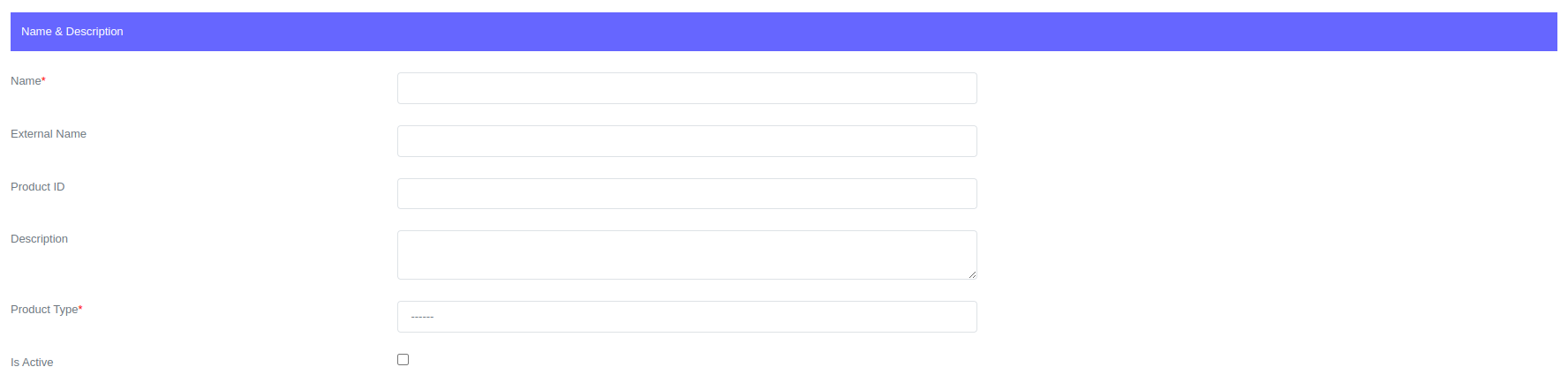
Name
The loan product name is used internally by system users to quickly identify the type of loans that can be offered to different clients.
External Name
The loan product external name is used externally by clients to easily identify the type of loan they are looking for. The external name can be displayed on clients applications such as portals and chatbots.
Product ID
A product key is a unique identifier used to distinguish different products. If the product key is left blank when the product is created, the system generates a unique key.
Description
A product description is a narration of a product that describes its use, target market, and even availability. It is useful for other system users who are trying to understand the product.
Product Type
The product type determines the set of features that are available to configure. You can select Fixed term loan or Interest free loan.
- Fixed Term Loan - a fixed term loan is a loan type that has interest rate that stays the same during the loan's entire tenure.
- Interest Free Loan - Interest free loans are loans in which no interest needs to be paid. With interest free loans, only the original principal must be repaid.
Is Active
When checked, the product will be active and available to clients.
Principal Settings

Currency
Select product currency. For more on currencies, see Currencies.
Minimum Principal Amount
The minimum principal amount is the lower limit of the amount that is allowed when creating a loan with this loan product. This constraint is designed to guide users when creating new loans.
Maximum Principal Amount
The maximum principal amount is the upper limit of the amount that is allowed when creating a loan with this loan product. This constraint is designed to guide users when creating new loans.
Interest Settings

When a new loan is created, the total interest due for the entire term of the loan is accrued and applied to the account on the disbursement date. This means that interest is charged on the entire amount of the loan from the day it is disbursed.
Interest Method
Lenda system supports Flat Rate, Reducing Balance - Equal Installments and Reducing Balance - Equal Principal methods. For more on interest methods, see Interest Methods.
Interest Interval
The interest interval determines the period at which interest is charged on a new loan created. The options are per day, week, month, or year.
Minimum Loan Interest
The minimum loan interest is the lower limit of the interest that is allowed when creating a loan with this loan product. This constraint is designed to guide users when creating new loans.
Maximum Loan Interest
The maximum loan interest is the upper limit of the interest that is allowed when creating a loan with this loan product. This constraint is designed to guide users when creating new loans.
Top-Up Settings

Topup Window Period In Days
Topup window is the grace period of days during which a top-up is still allowed. The default value is zero, when left unchanged it means that top-ups are not allowed for this product. If the top-up window period is set to 10, then top-ups are allowed for the first 10 days after the loan is created. After the 10th day, top-ups are no longer allowed.
Number Of Topups Allowed Per Loan
Number of top-ups allowed per loan. Default is value is zero. When left unchanged it means that top-ups are not allowed for this product. If set to 2 it means that only 2 top-ups are allowed on single loan when created.
Maximum Top-Up Amount As A Percentage
Total amount as a percentage of the initial principal that allowed. Default is value is zero. When left unchanged it means that top-ups are not allowed for this product. If set to 50% it means that only 50% on the initial principal can be allowed as top-up.
Tenure Settings
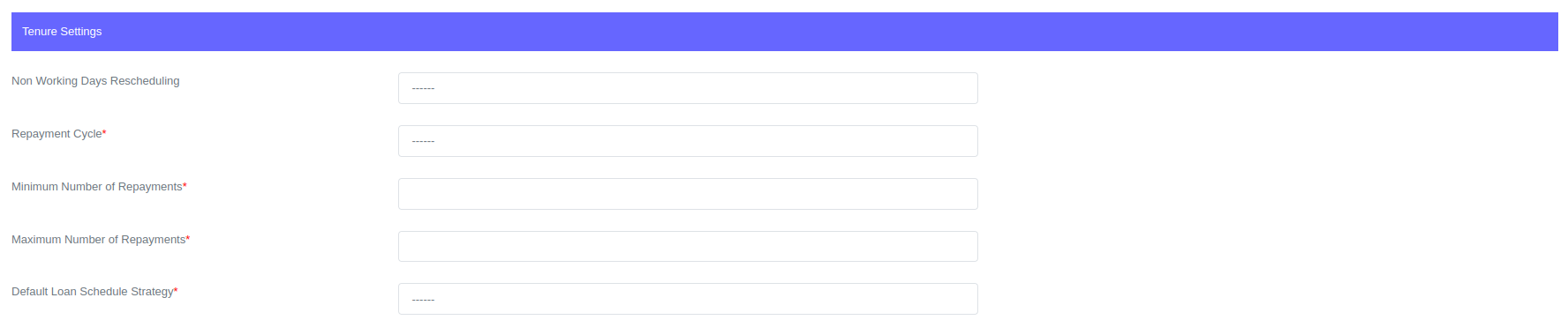
Non Working Days Rescheduling
If a payment is due on a non-working day, you can reschedule the payment to a working day. For example, if a payment is due on a Sunday, you can change the due date to the next or previous working day.
Another option is to extend the schedule. When this option is selected, the system ignores the installment when it is due on a non-working day and extends it to the next installment.
Repayment Cycle
A repayment cycle refers to the interval of time from the end of one payment date to the next. Lenda system supports Daily, Weekly, Biweekly, Monthly, Bimonthly, Quarterly, Every 4 months, Semi-annually and annually cycles.
Minimum Number of Repayments
The minimum number of repayments is the lower limit of the tenure that is allowed when creating a loan with this loan product. This constraint is designed to guide users when creating new loans.
Maximum Number of Repayments
The maximum number of repayments is the upper limit of the tenure that is allowed when creating a loan with this loan product. This constraint is designed to guide users when creating new loans.
Default Loan Schedule Strategy
The default loan schedule strategy determines the dates for the loan schedule when the loan is created. The strategy is dependent on the repayment cycle. For example, if the repayment cycle is monthly, the default loan schedule strategy will be same day, first day of the month, last day of the month, or monthly interval. The table below shows the relationship between the repayment cycle and the default loan schedule strategy.
The default loan schedule strategy options are dependent on the repayment cycle. The repayment cycle you select determines the options that can be seen on the default loan schedule strategy.
| Repayment Cycle | Default Loan Schedule Strategy |
|---|---|
| Daily | 1. Everyday |
| Weekly | 1. Every Mon, 2. Every Tue, 3. Every Wed, 4. Every Thu, 5. Every Fri, 6. Every Sat, 7. Every Sun, 8. Every 7 days |
| Biweekly | 1. Same Day, 2. Biweek interval |
| Monthly | 1. Same Day, 2. First Day of Next Month, 3. Last Day of Next Month, 4. Montly Interval |
| Bimonthly | 1. Same Day, 2. Bimonth interval |
| Quarterly | 1. Same Day, 2. Quarter interval |
| Every 4 months | 1. Same Day, 2. Quadrimester interval |
| Semi-annually | 1. Same Day, 2. Semi-annual interval |
| Annually | 1. Same Day, 2. Year interval |
Decimal Places, Rounding Off and Repayment Order

Decimal Places
You can configure the number of decimal places to use. The Lenda system supports rounding to two decimal places, rounding to one decimal place, and rounding to an integer.
Rounding Scheme
There are three options for how numbers are rounded in the system: Round Half Up, Round Up, and Round Down. Round Half Up rounds numbers up when the decimal is above 0.5 and down when the decimal is less than 0.5. Round Up rounds numbers up even if the decimal is less than 0.5. Round Down rounds numbers down even if the decimal is greater than 0.5.
Repayment Order
You can customize how payments are applied to an installment loan. The default distribution is penalty, fees, interest, and principal. However, you can change this order to suit your preferences. For example, you might want to apply a payment first to fees, then to penalty, then to interest, and finally to principal.
Product Availability

Client Type
The type of client determines the category of clients that this product is being offered to. Among the options are clients, groups, and solidarity groups.
Branches
Branches at which the product is available.
Fees
Before configuring loan fees on a loan product, you should first configure loan fees. There are various types of loan fees that Lenda systems support, including deducted, capitalized, upfront disbursement, payment due, and manual fees. For more information, see loan Fees
How to create fees:
- To open the form, simply click on the "Add Fee" button.

You can add as many fees as you would like to a loan product.
Loan Fees
Name of the fee to be configured on loan product.
Value
The value can be a fixed amount or a percentage. The fee configuration determines which one is used.
Auto Restructure Settings
Product configurations on loans that missed repayments. It allows you set new loan terms in case of defaults.
How to enable auto restructuring:
- To open the auto restructure fields, simply click on the "Enable Auto Restructure" check.

Auto Restructure Interest
New interest for restructured loans.
Auto Restructure Installments
Number of installments for restructured loans.
Defaults & Penalties

Allow Early Settlement On Loans With Unpaid Penalties
Configure the loan product to allow early settlement on loans that are in default and have unpaid penalties. This would allow clients to repay the loan in full and avoid further late fees and interest.
Send SMS Alert On Loan Default/Installment Reminders
Configure the system to send SMS reminders to clients when a loan payment is about to be due, or when a loan payment is in default.
Action On Default
If loans defaults and action on default is "Do Nothing" on loan product the system does nothing but if "Add Penalty" the system will automatically add penalties as configured.

Action On Default
This field should be set to "Add Penalty" in order to configure penalties.
Apply Penalty On
Penalty to be applied on Principal or Principal + Interest.
Penalty Rate Interval
Penalty to be charged at which intervals, per day, week, month or year.
Penalty Rate
Penalty rate charged.
Penalty Tolerance Period In Days
Grace period in days before the system starts adding penalties.